Introduction
In today’s fast-moving business world, clarity is power. Professionals need tools that help them organize ideas, streamline projects, and communicate plans visually. What Makes MindManager Different is not just its mind-mapping capability—it is its ability to transform scattered thoughts into structured, actionable workflows. Whether you are a project manager, entrepreneur, or knowledge worker, MindManager provides a visual system that elevates your thinking and your results.
1. Why Visual Thinking Matters More Than Ever
Modern work is increasingly complex. Information overload, remote collaboration, and tight deadlines demand tools that create clarity fast. Visual thinking helps you:
- See the big picture instantly
- Break down complex tasks into manageable steps
- Improve team communication
- Speed up problem-solving and planning
MindManager stands out because it brings all these strengths into a single platform.
2. What Makes It Different
This tool goes beyond basic mind-mapping. It combines structure, flexibility, and business-ready features that make it suitable for both individuals and teams.
2.1. Powerful, structured mind maps
MindManager allows you to map ideas visually—but with business-grade structure. You can convert mind maps into:
- Project roadmaps
- Task lists
- Flowcharts
- Strategic frameworks
- Knowledge dashboards
This makes it ideal for planning, strategizing, and presenting complex information.
Read more:Mastering Project Management: The Work Breakdown Structure (WBS) Demystified
2.2. Seamless project management tools
Unlike many mind-mapping apps, this platform integrates real task management features:
- Task dependencies
- Priority levels
- Progress tracking
- Start/end dates
- Resource assignment
You can manage entire projects directly within your map.
2.3. Flexible views for every workflow
Switch instantly between different perspectives:
- Mind Map View
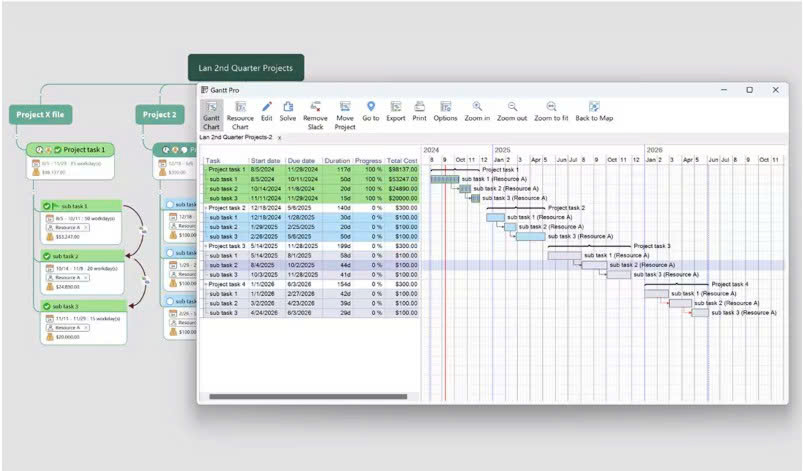
- Gantt Chart View
- Kanban Board
- Outline View
- Concept Map
- Organizational Chart
This flexibility keeps information fresh, actionable, and easy to understand.
2.4. Enterprise-friendly collaboration
MindManager supports real-time co-editing, making teamwork smooth—even in hybrid or remote environments. Teams can brainstorm, plan, and update maps together without confusion.
2.5. Integrations that support productivity
You can connect with:
- Microsoft Office
- Microsoft Teams
- SharePoint
- Slack
- Google Workspace
- Zapier
- Cloud storage services
These integrations help you turn ideas into action without switching platforms.
3. Who Should Use MindManager?
MindManager is designed for professionals who manage complexity daily:
- Project managers
- Entrepreneurs and startup teams
- Business strategists
- Students and educators
- Operations managers
- Product developers
- Marketing planners
If your work involves planning, analyzing, or organizing—MindManager will elevate your workflow.
4. Alternatives to Consider
While MindManager offers a robust, business-ready solution, exploring alternatives can help you find the best fit:
4.1. XMind
A clean, simple mind-mapping tool ideal for personal use and brainstorming. It’s affordable and visually appealing, but lacks MindManager’s advanced project management features.
4.2. Miro
A collaborative online whiteboard great for remote teams. Highly interactive, perfect for workshops and real-time co-creation. However, it can feel overwhelming for structured project planning.
4.3. Lucidchart
A powerful diagramming tool for flowcharts, org charts, and systems mapping. Great for technical teams, but less suited for creative brainstorming and flexible idea development.
5. Why MindManager Is Worth Considering
MindManager isn’t just for mapping ideas—it’s for transforming them into action. Its combination of structure, usability, and business-grade features makes it uniquely powerful. If you want a tool that helps you think clearly, plan confidently, and communicate effectively, MindManager is a strong contender.